
Genzaar Kids App
Gamified Financial Learning Platform for Children
Project Overview
A Gamified Financial Learning Experience
Genzaar Kids is a concept mobile platform designed to help children learn money management through gamified saving, rewards, and goal-based financial habits. The app empowers parents to guide spending behavior while giving children a fun and interactive environment to build financial literacy skills early. The project explores how playful digital experiences can teach responsibility, saving habits, and goal setting in a safe, parent-controlled ecosystem.
My Role
Product Designer (Concept Development)
I led the end-to-end design process, transforming financial education into a playful, intuitive mobile experience tailored for both children and parents.

The Challenge
Teaching Finance to Children in an Engaging Way
Financial literacy is rarely taught early, yet developing responsible money habits from a young age builds lifelong confidence and independence. Parents need tools that help guide children's spending and saving behavior while keeping them engaged.
The challenge was to design a platform that:
- Makes financial education engaging for children
- Provides parental control and visibility
- Encourages consistent saving habits
- Builds positive reward-based behaviors
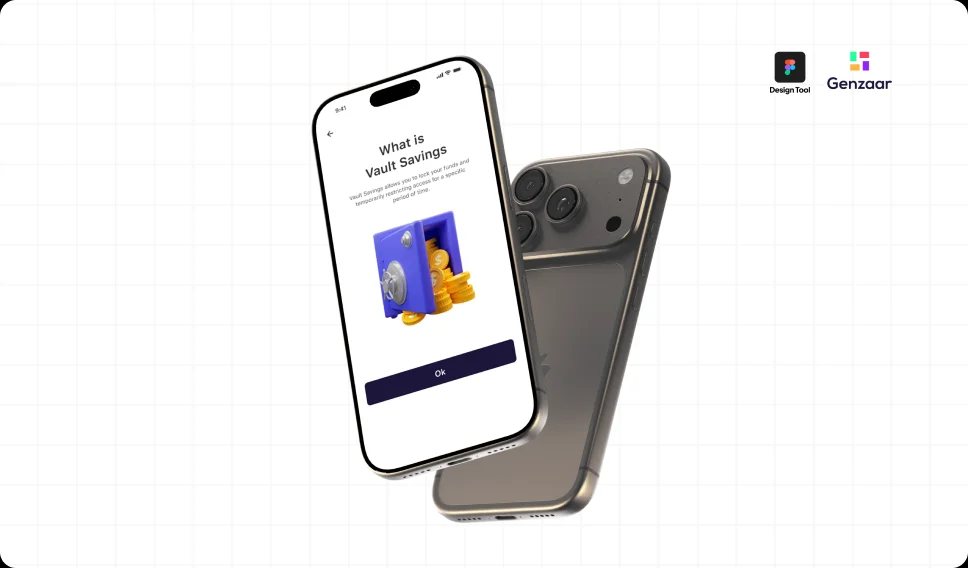
Financial education tools for children can improve responsibility and awareness from an early age.
Objectives
Design a Playful Financial Learning Experience
- Teaches saving, spending, and goal setting
- Motivates children through rewards and gamification
- Enables parental monitoring and guidance
- Builds trust through clarity and transparency
- Encourages long-term financial responsibility
Target Users
Children & Parents
Children (Ages 6–14)
- Motivated by rewards, progress, and play
- Learning responsibility and delayed gratification
- Need visual and engaging interactions
Parents & Guardians
- Want to teach responsible money habits
- Need spending oversight and control
- Seek educational yet safe digital tools
User Persona
Designing with Aisha in Mind
By considering Aisha's goals, addressing her pain points, and designing the bank app with her needs in mind, this made it possible for me to create a user-centric experience that empowers Emily to manage her finances effectively and enjoy a seamless game coin conversion process.

Research & Insights
Key Behavioral Insights
- Children learn faster through visual and interactive feedback
- Gamification increases engagement and habit retention
- Parents prefer structured oversight with flexibility
- Rewards reinforce positive financial behavior
Competitive Inspiration
Apps in the youth fintech space use goals, rewards, and parental controls to teach money skills in a safe environment.
Design Process
Research-Led, User-Centered Design
The design process begins with thorough research and user analysis. I did a qualitative research to understand users behaviors, needs and pain points. Throughout the design process, I collaborate with stakeholders, developers, and other team members to create a web and mobile banking app that seamlessly integrates fund transfers and game coin conversion, ensuring a user-friendly and engaging experience for the app's target audience.

UX Strategy
Design Principles
Playful Learning
Make financial education feel like a game.
Clarity & Simplicity
Use clear visual cues and simple flows.
Motivation Through Rewards
Encourage consistent progress with achievements.
Parent-Child Collaboration
Enable shared financial goals and oversight.
Style Guide
Building a Cohesive Visual Identity
A color style guide is an essential tool for maintaining consistency and visual harmony in design. It provides designers with a set of predefined colors that can be used throughout the design process. The color style guide include a set of primary colors that represent the brand's identity. These colors typically include the brand's main colors and other supported colors that align with the brand's visual identity.

User Flow
Mapping the Core User Journey
The user-flow chart is a visual representation of the steps a user takes to complete a specific task or achieve a particular goal within the web and mobile app. Users may make mistakes when entering recipient account details or transfer amounts, leading to failed transactions or delays. Implementing input validation and providing clear instructions can minimize data entry errors and improve the overall user experience. By addressing these pain points through thoughtful design considerations, I was able to improve the user experience and increase user satisfaction when using the web and mobile app.

Low-Fidelity Wireframe
Structural Layout and Hierarchy
The wireframe focuses on the structural elements of the interface, presenting a simplified version of the layout without detailed visual design. This defines structure and placement of key components, such as headers, navigation menus, content sections, sidebars, and footers. The wireframe establishes the overall hierarchy and spatial organization of these elements.

Hi-Fidelity Wireframe
Final Screen Design
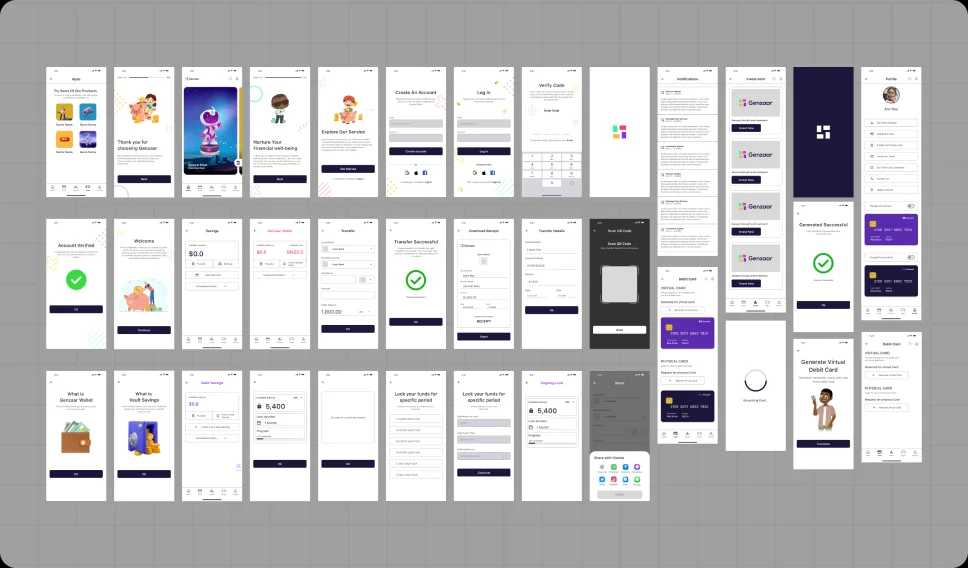
The final screen exhibits a visually appealing and cohesive design that aligns with the brand identity and the overall design language established throughout the project.

Key Features
Core Functionalities
Savings Goals & Progress Tracking
Children set goals and visually track progress, building motivation and responsibility.
Task & Reward System
Parents assign tasks; children earn coins and rewards upon completion.
Parental Controls & Spending Limits
Parents manage spending thresholds and monitor transactions.
Achievement & Milestones
Badges and milestones reinforce positive behavior and consistency.
Visual Spending Tracker
Simple charts help children understand where their money goes.
Key Metrics
Projected Impact on Learning & Habits
Gamified progress tracking is projected to increase weekly app engagement.
Goal visualization and rewards could improve savings completion rates.
Centralized controls may reduce monitoring time.
Early exposure to financial planning tools can improve responsible spending habits over time.
Challenges & Design Solutions
Solving for Children and Parents
Challenge: Making finance understandable for children
Solution: Visual metaphors, animations, and simplified dashboards.
Challenge: Balancing fun with responsibility
Solution: Gamification tied to real-world financial behavior.
Challenge: Building trust for parents
Solution: Transparent controls and clear activity tracking.

Outcome & Learnings
Gamified UX Transforms Financial Education
This concept demonstrates how gamified UX and thoughtful product design can transform financial education into an engaging and empowering experience.
Key Takeaways
- Gamification strengthens habit formation
- Visual feedback improves comprehension
- Parent-child collaboration builds accountability
- Simple UX drives long-term engagement
Next Steps & Future Enhancements
Expanding the Platform
- Prepaid card integration
- Real-world rewards marketplace
- Financial literacy mini-lessons
- AI-powered savings recommendations
- Multi-child household management

Final Reflection
Empowering the Next Generation
Designing Genzaar Kids reinforced the importance of creating experiences that are not only functional but transformative. By merging financial literacy with playful interaction, the platform empowers the next generation with skills that last a lifetime.
Tools & Software
Committed to staying current with the latest design trends and technologies and continuously learn new tools to grow in my field.
Tools & Software
Committed to staying current with the latest design trends and technologies and continuously learn new tools to grow in my field.





Trusted by Teams & Brands
A selection of companies I've worked with, contributing to products, brands, and experiences that drive impact and results.




